Showing posts with label Collect. Show all posts

Saturday, May 3, 2014

Happy National Scrapbooking Day and a layout with March overview.

 {A Layout} March

I usually do do any blog post on the weekends. But today is an exception.
Because today is the NSD. National Scrapbooking Day!! Yay!

In celebration of this holiday as a crafter. I signed up for a retreat at our scrapbooking store. How fun. 

So follow me on Instagram to see photos. 

And if you would like to know how I make this monthly collage with Collect app. You can find my tutorial HERE.

Thanks for coming to my blog.

Wednesday, March 5, 2014

{A Layout} February overview and chic tags exclusive kit


{A Layout} February overview

I had to admit that I wasn't a big fan of Chic tags, until I saw their booth at the 2014 CHA. Wow, it's an eye opener for me. Their tags are just adorable. Also I am drooling over their new collections, including papers, wood veneers...etc. 
I LOVE them ALL. 

SO after I returned home, I followed their blog and found out about their monthly kit, I decided to give a try. As I am writing this blog post, I received 3 months of their kits so far. 
Sum in one word, LOVE. 

They are adorable and trendy. They work with my layouts and project life very well. I am thinking about making a vacation mini using the March kit. :)

The layout I created is mainly using the January kit and a little bit of February kit and this project is for their February sketch. :)
And I created my photo collage using Collect. 

Tuesday, September 17, 2013

My favorite app Collect for Project Life


Hi, my blog friends,
A while ago I share my favorite app Collect with you. And today I'd love to show you how I use it as a planner for my Project Life.
The Picture above is how the icon looks like on my iPhone. After you download it from the iTune. Click on the icon.


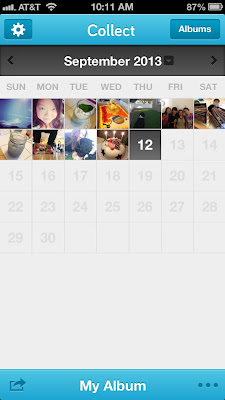
Then you will see this interface, click on the date block where you'd like to add photo

Click on Add photo 

 
And Choose photo

It will show you all the albums on your phone. Choose the one and click on it


Here is the album. Click on the photo you like. It can be single photo or multiple photos.


 You can Move and Scale the photo until you are happy with it.


After the photo is chosen, you can add personal note on the Add caption or Tag people or place as a note for future use. And then click on Save


Hope you can find this helpful and enjoy this app as much as I do when you do your Project Life. TFL.


Wednesday, September 11, 2013

Amy Tangerine's new Cut & Paste


Here they are.Amy Tangerine's new Cut & Paste by American Crafts are finally hitting the local store last weekend. Yay! Been waiting for a while, will, at least waiting since the CHA announcement. HA!

So I decided to scrap my June overview using Collect. Its the best month in 2013. And this is another adorable collection by Amy.


Tuesday, September 3, 2013

My August recap using collect


I just love my Collect app on my iPhone. For those of you who also do Project life, definitely check it out in your App Store.
This app allows you to upload single photo or multiple photos each day. And you can share the monthly overview using Flickr, Instagram and Facebook. :) I also use this app as a reminder when I work on my Project Life spreads. Love it so much and can't live without. HA!

Valerie~Love life.